31 déc. 2015

vim: comment commenter plusieurs lignes d'un coup

Commenter plusieurs lignes d'un coup dans VIM c'est possible.

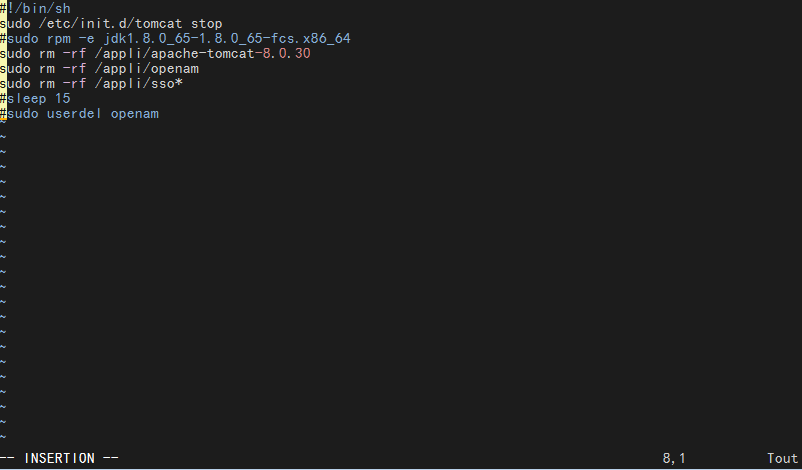
Tout d'abord il faut se mettre sur la ligne à partir de la quelle on veut ajouté puis taper simultanément (après avoir fait echap):

CTRL+V
et descendre jusqu'à la ligne que l'on veut commenter.


Quand c'est bon, taper d'abord sur les deux points ":" puis entrer la chaine suivante

s/^/#/
  et voilà ! 


Il n'y a plus qu'à enregistrer (:wq)


Pour la petite explication:
"s" signifie substitution
"^" signifie le début de la ligne

Pour faire l'opération inverse:

s/^#//

29 déc. 2015

Télécharger Java via wget ou curl

Pour télécharger Java (jdk ou jre) depuis le site d'Oracle, il faut accepter la licence :

Cependant si l'ont veut télécharger le binaire via la commande wget ça devient compliqué...

Mais il existe une solution.

RPM
wget --no-check-certificate --no-cookies --header "Cookie: oraclelicense=accept-securebackup-cookie" http://download.oracle.com/otn-pub/java/jdk/8u65-b17/jdk-8u65-linux-x64.rpm
TAR.GZ

wget --no-check-certificate --no-cookies --header "Cookie: oraclelicense=accept-securebackup-cookie" http://download.oracle.com/otn-pub/java/jdk/8u65-b17/jdk-8u65-linux-x64.tar.gz
 RPM (en utilisant CURL)
curl -v -j -k -L -H "Cookie: oraclelicense=accept-securebackup-cookie" http://download.oracle.com/otn-pub/java/jdk/8u65-b17/jdk-8u65-linux-x64.rpm > jdk-8u65-linux-x64.rpm
  • -j : junk cookies
  • -k : ignore certificates
  • -L : follow redirects
  • -H [arg] : headers
.
Source : http://stackoverflow.com/questions/10268583/downloading-java-jdk-on-linux-via-wget-is-shown-license-page-instead

28 déc. 2015

Git : annuler proprement un commit après un push


Pas très bien réveillé, j'ai fais le commit d'un dossier entier, cependant ce n'était pas le bon !

J'ai donc cherché à faire un retour arrière. Mais j'ai chercher à faire le truc le plus proprement possible.


Ce qu'il faut éviter


Pour annuler des commits, il existe la commande git reset.

git reset --hard HEAD~1
HEAD is now at 444b1cf Rhoo

Celle-ci est pertinente tant que les commits n'ont pas été poussés. Git vous retiendra au push d'ailleurs :

git push
To /tmp/repo
 ! [rejected]        master -> master (non-fast-forward)
error: failed to push some refs to '/tmp/repo'

En effet, à partir du moment où un commit existe sur le serveur, il est potentiellement utilisé par des collaborateurs (mergé, à la base d'une branche, etc.). On pourrait faire le sale et forcer le push :

git push -f
Total 0 (delta 0), reused 0 (delta 0)
To /tmp/repo
 + b67c343...444b1cf master -> master (forced update)

Mais il y a beaucoup mieux !

Ce qu'il faut faire


Annuler un commit, c'est finalement appliquer l'inverse de son diff !

On peut rediriger le diff des commits à annuler vers la commande patch --reverse :)

git diff HEAD^ | patch --reverse

Pour faire plus simple, il y a git revert !

Par exemple pour annuler les trois derniers commits :

git revert HEAD~3..HEAD

Ou pour annuler un commit en particulier :

git revert 444b1cff

Il suffit alors de pousser proprement le commit obtenu sur le serveur. Les éventuels collaborateurs qui avaient basé leur travail sur les commits annulés devront gérer les conflits au moment venu...

SOURCE:  http://blog.mathieu-leplatre.info

27 déc. 2015

Anonymous on the Internet - Part 1 - Tor project

How to be anonymous on the internet? I'm starting some articles about this question.

My first article is on Tor network and the Tor project.


What is Tor?

The Tor network is a group of volunteer-operated servers that allows people to improve their privacy and security on the Internet. Tor's users employ this network by connecting through a series of virtual tunnels rather than making a direct connection, thus allowing both organizations and individuals to share information over public networks without compromising their privacy. Along the same line, Tor is an effective censorship circumvention tool, allowing its users to reach otherwise blocked destinations or content. Tor can also be used as a building block for software developers to create new communication tools with built-in privacy features.
Individuals use Tor to keep websites from tracking them and their family members, or to connect to news sites, instant messaging services, or the like when these are blocked by their local Internet providers. Tor's hidden services let users publish web sites and other services without needing to reveal the location of the site. Individuals also use Tor for socially sensitive communication: chat rooms and web forums for rape and abuse survivors, or people with illnesses.
Journalists use Tor to communicate more safely with whistleblowers and dissidents. Non-governmental organizations (NGOs) use Tor to allow their workers to connect to their home website while they're in a foreign country, without notifying everybody nearby that they're working with that organization.
Groups such as Indymedia recommend Tor for safeguarding their members' online privacy and security. Activist groups like the Electronic Frontier Foundation (EFF) recommend Tor as a mechanism for maintaining civil liberties online. Corporations use Tor as a safe way to conduct competitive analysis, and to protect sensitive procurement patterns from eavesdroppers. They also use it to replace traditional VPNs, which reveal the exact amount and timing of communication. Which locations have employees working late? Which locations have employees consulting job-hunting websites? Which research divisions are communicating with the company's patent lawyers?
A branch of the U.S. Navy uses Tor for open source intelligence gathering, and one of its teams used Tor while deployed in the Middle East recently. Law enforcement uses Tor for visiting or surveilling web sites without leaving government IP addresses in their web logs, and for security during sting operations.
The variety of people who use Tor is actually part of what makes it so secure. Tor hides you among the other users on the network, so the more populous and diverse the user base for Tor is, the more your anonymity will be protected.

Why we should use Tor ?

Using Tor protects you against a common form of Internet surveillance known as "traffic analysis." Traffic analysis can be used to infer who is talking to whom over a public network. Knowing the source and destination of your Internet traffic allows others to track your behavior and interests. This can impact your checkbook if, for example, an e-commerce site uses price discrimination based on your country or institution of origin. It can even threaten your job and physical safety by revealing who and where you are. For example, if you're travelling abroad and you connect to your employer's computers to check or send mail, you can inadvertently reveal your national origin and professional affiliation to anyone observing the network, even if the connection is encrypted.
How does traffic analysis work? Internet data packets have two parts: a data payload and a header used for routing. The data payload is whatever is being sent, whether that's an email message, a web page, or an audio file. Even if you encrypt the data payload of your communications, traffic analysis still reveals a great deal about what you're doing and, possibly, what you're saying. That's because it focuses on the header, which discloses source, destination, size, timing, and so on.
A basic problem for the privacy minded is that the recipient of your communications can see that you sent it by looking at headers. So can authorized intermediaries like Internet service providers, and sometimes unauthorized intermediaries as well. A very simple form of traffic analysis might involve sitting somewhere between sender and recipient on the network, looking at headers.
But there are also more powerful kinds of traffic analysis. Some attackers spy on multiple parts of the Internet and use sophisticated statistical techniques to track the communications patterns of many different organizations and individuals. Encryption does not help against these attackers, since it only hides the content of Internet traffic, not the headers.

The solution: a distributed, anonymous network 


Tor helps to reduce the risks of both simple and sophisticated traffic analysis by distributing your transactions over several places on the Internet, so no single point can link you to your destination. The idea is similar to using a twisty, hard-to-follow route in order to throw off somebody who is tailing you — and then periodically erasing your footprints. Instead of taking a direct route from source to destination, data packets on the Tor network take a random pathway through several relays that cover your tracks so no observer at any single point can tell where the data came from or where it's going.
To create a private network pathway with Tor, the user's software or client incrementally builds a circuit of encrypted connections through relays on the network. The circuit is extended one hop at a time, and each relay along the way knows only which relay gave it data and which relay it is giving data to. No individual relay ever knows the complete path that a data packet has taken. The client negotiates a separate set of encryption keys for each hop along the circuit to ensure that each hop can't trace these connections as they pass through.


Once a circuit has been established, many kinds of data can be exchanged and several different sorts of software applications can be deployed over the Tor network. Because each relay sees no more than one hop in the circuit, neither an eavesdropper nor a compromised relay can use traffic analysis to link the connection's source and destination. Tor only works for TCP streams and can be used by any application with SOCKS support.
For efficiency, the Tor software uses the same circuit for connections that happen within the same ten minutes or so. Later requests are given a new circuit, to keep people from linking your earlier actions to the new ones.

Staying anonymous

Tor can't solve all anonymity problems. It focuses only on protecting the transport of data. You need to use protocol-specific support software if you don't want the sites you visit to see your identifying information. For example, you can use Tor Browser while browsing the web to withhold some information about your computer's configuration.
Also, to protect your anonymity, be smart. Don't provide your name or other revealing information in web forms. Be aware that, like all anonymizing networks that are fast enough for web browsing, Tor does not provide protection against end-to-end timing attacks: If your attacker can watch the traffic coming out of your computer, and also the traffic arriving at your chosen destination, he can use statistical analysis to discover that they are part of the same circuit.

The future of Tor

Providing a usable anonymizing network on the Internet today is an ongoing challenge. We want software that meets users' needs. We also want to keep the network up and running in a way that handles as many users as possible. Security and usability don't have to be at odds: As Tor's usability increases, it will attract more users, which will increase the possible sources and destinations of each communication, thus increasing security for everyone. We're making progress, but we need your help. Please consider running a relay or volunteering as a developer.
Ongoing trends in law, policy, and technology threaten anonymity as never before, undermining our ability to speak and read freely online. These trends also undermine national security and critical infrastructure by making communication among individuals, organizations, corporations, and governments more vulnerable to analysis. Each new user and relay provides additional diversity, enhancing Tor's ability to put control over your security and privacy back into your hands.
SOURCE : https://www.torproject.org/about/overview.html.en

Download Tor

You can download Tor Browser ....
Follow this link : https://www.torproject.org/download/download-easy.html.en


And run anonymously on the Internet ! (like Thor)


16 déc. 2015

Bookmarks - useful websites

Useful websites for Sysadmin, Network administrator, IT Architects, developpers


http://www.kloth.net/services/
lot of services like: NSLOOKUP, DIG, WHOIS, TRACEROUTE
Useful when you're behind a Proxy.

http://meyerweb.com/eric/tools/dencoder/
Sometime you have "%20 %" when you copy some URL on the internet. You can decode that on this website.

http://pkgs.org/
Linux Packages Search: search engine to find packages on a large panel of Linux Distribution. Very useful for your dependencies!

http://www.cyberciti.biz/
Very good blog with tips for Linux systems.

More links are coming soon...

15 déc. 2015

OMD - Supervision facile à déployer

C'est quoi au juste "OMD" ?

OMD (Open Monitoring Distribution) est un paquet permettant d’installer votre supervision sur mesure.
Ce projet est né afin de simplifier l’installation des briques de supervision autour de Nagios et de les standardiser quelque soit la distribution Linux. Ceci permet à des utilisateurs moins expérimentés aux environnements GNU/Linux et Supervision de pouvoir se monter un serveur de supervision sans effort particulier.

OMD est actuellement à la version 0.44 et une version 0.46 est en cours de finalisation. Ce projet est à l’initiative de grands noms et acteurs majeurs de la communauté allemande comme :
  • Lars Michelsen (Fort contributeur à l’Eco-Système Nagios)
  • Mathias Kettner (Créateur du check_MK et MK_LiveStatus)
  • Wolfgang Barth (Auteur de livres autour de l’administration Réseaux)
  • Gerhard Laußer (Auteur de livres sur Nagios, développeur de plugins & Shinken Team)
  • Joerg Linge (Créateur de PNP4Nagios)
  • Matthias Flacke (Développeur de plugin comme check_multi & Icinga Team)
  • Michael Friedrich (Contributeur Nagios & Icinga Team)
  • Stefan Hoesl
  • Sven Nierlein (Créateur de Thruk)
  • Benjamin Odenthal
Ce paquet disponible au format rpm et deb vous permet d’installer de manière normaliser les différentes briques de l’éco-système de Nagios selon vos besoins. Ce paquet embarque les solutions suivantes :
  • nagios-3.2.2
  • Shinken (in 0.46)
  • nagvis
  • pnp4nagios
  • rrdtool/rrdcached
  • nagios-plugins
  • Check_MK
  • MK Livestatus
  • Multisite
  • dokuwiki
  • nsca
  • Thruk (new in 0.44)
  • check_nrpe
  • check_logfiles (new in 0.44)
  • check_oracle_health (new in 0.44)
  • check_mysql_health (new in 0.44)
  • jmx4perl (new in 0.44)
  • check_webinject (new in 0.44)

OMD est installable sous les plateformes GNU/Linux suivantes :

  • Debian Squeeze
  • Ubuntu 10.04 LTS
  • SLES
  • RedHat
  • CentOS
(source: http://www.monitoring-fr.org/2011/02/omd-open-monitoring-distribution/)

Comment installer OMD?

En premier lieux, vous devez avoir un système Linux ; une distribution telle que  Debian, Ubuntu, CentOS, RedHat ou SLES11 (qui sont supportés. Avant de choisir une version particulière, vérifier que des packages sont disponibles pour celle-ci (ça équivaut pour tout, pas que OMD).

Vous pouvez trouvé les paquets disponibles à cette adresses : http://omdistro.org/download

Veuillez noter que OMD est installé dans le répertoire /opt/omd , vous devez donc avoir les droits root et vous assurer que vous avez suffisement de place disque sur la partition /opt. Pour un rapide calcul si vous avez 1000 hosts à superviser vous aurez besoin de 10Go.


Installation de OMD

Debian and Ubuntu

Le plus simple est d'utiliser gdebi pour installé le package, qui va installer tous les packages nécessaires (dépendances) à OMD.
root@linux# gdebi omd-2013.08.27.mk_0.wheezy_amd64.deb
Deux modules proxy Apache sont nécessaires, vous devez activer ceux ci :
root@linux# a2enmod proxy_http
root@linux# /etc/init.d/apache2 restart 

RedHat and CentOS

Sur Redhat et CentOS, vous devez installer au préalable le repository EPEL:
root@linux# rpm -Uvh http://download.fedora.redhat.com/pub/epel/5/i386/epel-release-5-4.noarch.rpm
Pour installer OMD utiliser la commande yum :
root@linux# yum install --nogpgcheck omd-0.42-0.42-centos55.14.x86_64.rpm
L'option --nogpgcheck peut être utilisée si le package n'est pas signé.

(traduction partiel depuis : https://mathias-kettner.de/checkmk_install_with_omd.html ET suite de la configuration)

Bien évidement, changez les numéro de version etc.

DevOps pour les Nuls (developpez.com)


DevOps (abréviation de développement et opérations), à l'instar de nombreuses nouvelles approches, est souvent un mot à la mode pour beaucoup de personnes. Tout le monde en parle, mais tout le monde ne sait pas ce que c'est. De manière générale, DevOps est une approche qui repose sur les principes Lean et Agile dans lesquels les responsables métier avec les services de développement, des opérations et d'assurance qualité collaborent pour délivrer le logiciel en continu dans l'objectif de permettre à l'entreprise de saisir plus rapidement les opportunités du marché et d'accélérer la prise en compte des retours clients. En effet, les applications d'entreprise sont si diverses et composées de tant de technologies, bases de données, d'équipements utilisateurs, etc., que seule une approche DevOps permet de gérer avec succès toute cette complexité. Cependant, les opinions sur son utilisation divergent.

Certains affirment que DevOps s'adresse aux professionnels uniquement. D'autres avancent qu'il tourne autour du cloud. IBM propose une vue large et holistique et considère DevOps comme une approche de livraison du logiciel orientée métier : une approche qui porte une fonctionnalité nouvelle ou une amélioration de l'idée jusqu'à la mise en production, en fournissant de la valeur métier aux clients finals de manière efficace et en capturant les retours des utilisateurs de cette nouvelle fonctionnalité. Pour ce faire, la participation de toutes les parties prenantes, bien au-delà des équipes de développement ou des opérations, est indispensable. Une véritable approche DevOps englobe les lignes métier, les utilisateurs, les responsables, les partenaires, les fournisseurs, etc.

Source et suite : http://bluemix.developpez.com/cours/devops-pour-nuls/

Différences majeures entre Red Hat 6, 7, 8 et 9

Quelles sont les différences majeures entre RHEL 6, 7, 8 et 9 ? Système de fichiers RHEL 6: Par défaut : ext4. Autres : ext2, ext3 supportés...